.png?width=200&height=200&name=dovetail%20workmarklogo%20(1).png)

Why Copilot, Why Now
AI is becoming part of everyday work whether teams plan for it or not.
People are already using it in small, tactical ways, and most organisations are now trying to turn that into something safe, reliable and measurable. For Legal and enterprise teams, this shift isn’t abstract, the tools they use every day are changing around them.
For Legal teams, the question is less about whether AI will be used, and more about where that use happens, inside governed enterprise systems, or in tools that sit outside existing compliance frameworks.
Before generative AI became part of everyday work, Microsoft 365 was already where much of the organisation’s operational activity lived. Contracts are drafted in Word, risk is tracked in Excel., advice is shared in Outlook and decisions are documented in Teams.
For in-house legal teams, that often means:
- Reviewing agreements in Word
- Managing obligations in Excel
- Negotiating terms over email
- Preparing board level summaries in PowerPoint
- Review more agreements
- Move at a faster pace
- Support revenue generating teams
- Maintain defensibility and auditability
All without proportional increases in headcount.
Copilot introduces AI into the tools Legal already uses. The result is not a new platform to manage, but assistance embedded into the day to day workflow.
The practical question for in‑house teams, then, is this: as AI becomes part of how legal work gets done, do legal teams actually need specialised, standalone Legal AI platforms to operate safely and effectively, or can Microsoft 365 Copilot, embedded within governed enterprise systems, meet the core requirements for legal review, drafting, collaboration and defensibility within the tools they already trust?
How Copilot Works
Copilot sits inside Microsoft 365 and works with the documents, emails and data your team already has permission to access.
It can read contracts in Word, summarise email threads in Outlook, compare versions, or pull key terms into Excel, without moving information outside your tenant.
It follows the same permissions, labels and compliance policies already applied across Microsoft 365, so AI assisted work stays within governed enterprise systems.
Read further about Microsoft security and GDPR here.
5 Copilot Features Your Team Will Use
1. Draft and Redline Contracts in Word
Generate first‑pass drafts or suggest alternative clause wording based on internal precedent which can reduce time spent preparing initial versions of frequently used agreements such as NDAs or supplier terms.
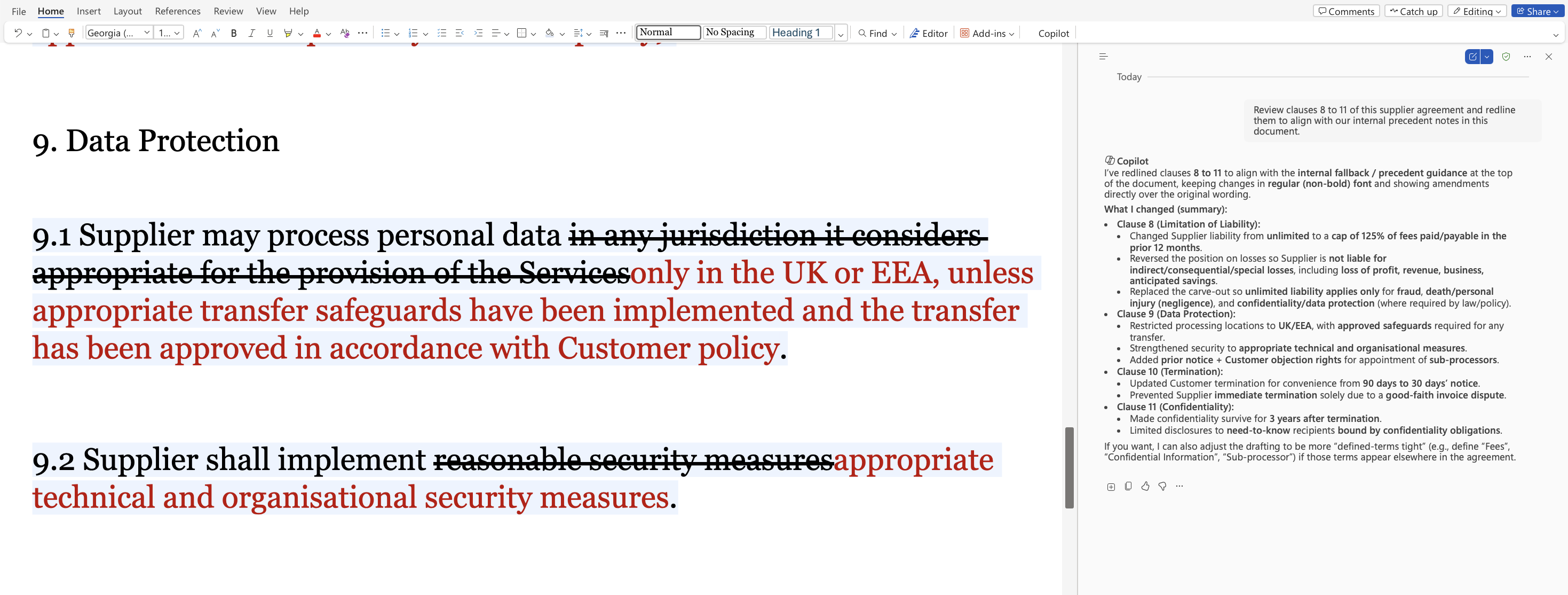
Image - Shows Copilot pane in Word, editing the contract without copy and paste
2. Summarise Agreements for Stakeholders
Turn a 40‑page supplier contract into a short commercial summary for Finance or Procurement, which makes it easier to share key commercial risks internally without requiring full legal review meetings.
3. Extract Key Terms into Excel
Automatically surface dates, payment terms, or renewal obligations into structured trackers It gives Legal a clearer view of renewal dates and commercial terms without building trackers manually.
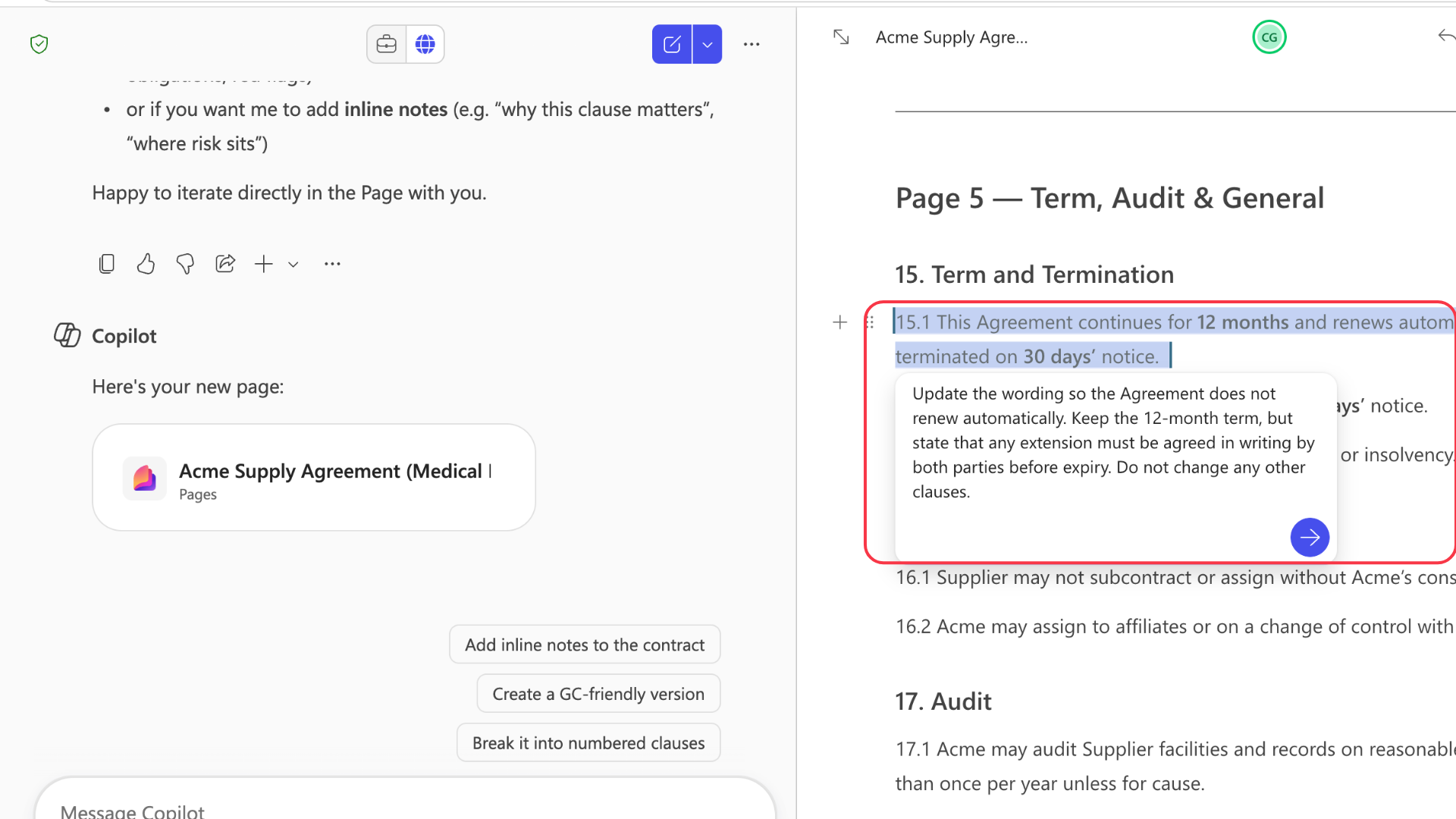
4. Edit Specific Clauses Within Agreements inside Copilot Pages
Review or revise individual terms without needing to work through the full document. It allows Legal teams to update wording where needed without repeating full agreement reviews.
5. Turn Advice into Presentations
Convert legal analysis into board ready PowerPoint summaries. It’s a simple way to share legal thinking in a format senior stakeholders expect.
Beyond Individual Tasks: Supporting Legal Workflows
Using Copilot Studio, organisations can create agents aligned to internal legal processes such as contract intake, policy review, or supplier onboarding.
These agents can:
- capture legal requests through a structured intake process
- check submissions against internal legal playbooks
- route agreements based on risk level or contract type
- flag non‑standard terms before Legal review
- extract key information for obligation tracking
Rather than assisting with drafting alone, this allows AI to support how legal work enters and moves through the business.
This can be particularly useful in areas where requests vary in complexity, such as NDAs, Financial Crime, supplier onboarding agreements or internal policy updates, helping teams focus review time on higher‑risk matters.
Some organisations also use agents at the intake stage to guide business users through required information before Legal review begins.
We can help design and implement agents aligned to your internal legal workflows.
Use Cases By Scenario
Commercial Agreement Review
During busy commercial periods, agreements often need to be reviewed at pace without slowing down deal cycles.
Copilot can:
- highlight non‑standard clauses against internal templates
- summarise commercial risks for internal stakeholders
- extract key terms for obligation
This allows Legal to move more quickly without losing visibility over higher risk terms.
Regulatory or Policy Updates
Legal teams often spend significant time reviewing recurring low risk contracts such as NDAs or supplier agreements.
Copilot can:
- compare updated policy wording against previous versions
- highlight changes to key obligations or requirements
- summarise updates for internal stakeholders
Reducing time spent on repeatable work while maintaining consistency.
Policy and Regulatory Updates
Updating internal policies or responding to regulatory change often involves reviewing previous versions and communicating updates across the business.
Copilot can:
-
identify sections impacted by the new regulatory requirement
-
provide draft wording for updated clauses
-
prepare clear summaries to share with internal teams
Supporting consistency while ensuring changes are clearly documented.
Supplier Onboarding
Procurement and supplier onboarding processes often involve multiple agreements and internal stakeholders.
Copilot can:
-
review onboarding agreements against standard terms
-
flag non-standard payment or termination clauses
-
extract supplier obligations for tracking
Onboarding can move forward across teams without increasing Legal review times.
Legal Intake and Triage
Internal legal requests can vary significantly in complexity and risk.
Using Copilot Studio, organisations can create agents that:
-
capture requests through strutted intake forms
-
route agreements based on contract type of risk level
-
request missing information before Legal review begins
Requests can be triaged earlier in the process, allowing Legal to focus review time on higher-risk matters while routine agreements are routed appropriately.
Governance That Enterprises Need
Adopting AI into legal workflows raises understandable concerns. Questions around where data is processed, how outputs are generated, and whether use can be monitored are often the first barrier to adoption.
Copilot is designed to operate within the same Microsoft 365 environment Legal teams already govern. It follows existing:
-
permissions each user already has in Microsoft 365
-
information protection labels that control access to specific documents and emails
-
retention and data loss prevention polices set by the organisations
Interactions can be monitored through:
-
standard Microsoft 365 audit logs
-
activity reporting within the Microsoft admin centre
-
controls that govern who can youse Copilot and how it is accessed
This means AI‑assisted work stays within the same compliance boundaries already used across Microsoft 365, givingLegal teams certainty over how organisational data is accessed, used and generated.
Getting Started
For most Legal teams, adoption begins with a small, governed pilot rather than a full rollout.
Common starting points include:
- reviewing low‑risk agreements such as NDAs
- using Copilot to summarise longer contracts for internal teams
- extracting key terms into trackers for obligation management
Pilot groups are often formed within:
- the Legal team
- Legal Operations
- Procurement or Commercial teams where relevant
This allows teams to:
- see how Copilot works with their own documents
- identify practical areas where it reduces review time
- gather feedback before wider rollout
Some organisations also begin by introducing Copilot Studio agents at intake, helping to guide how requests enter Legal before expanding into document‑level support.This approach allows teams to trial AI‑assisted workflows in a controlled way before broader rollout.
Some common FAQs
You can explore more detailed governance and deployment FAQs here:
Summary
AI is already appearing inside the tools Legal teams use to draft, review, and advise. The question is no longer whether it will be used, but whether that use happens within governed enterprise systems.
Copilot allows Legal to explore AI assisted workflows inside Microsoft 365, where permissions, auditability, and compliance controls already exist.From contract review to policy updates and legal intake, this creates an opportunity to reduce repeatable work while retaining oversight of how legal output is generated.
For teams under pressure to support the business without increasing headcount, this shifts AI from a productivity experiment to a governed part of the legal workflow.
Ready to explore Copilot inside your Legal workflow?
We can help you design a rollout that aligns with your existing controls and processes. Contact us using the form below.